TL;DR
Robotic vacuum cleaners are guided machines that use suction, brushes, and sensors to clean floors on a schedule, with newer models often adding room maps and obstacle detection. They can reduce everyday dust, crumbs, and pet hair, but performance depends on your floor plan, rugs, clutter, and upkeep; check those details before paying extra for a mop or multifunction dock.
A robot vacuum can spend an hour circling your living room and still leave the tangle of hair under the dining table. That’s because a neat map and a glossy feature list don’t tell you how the machine will handle your rugs, cables, or furniture.

Get cleaning gear delivered free with Prime
- Fast, free delivery on millions of items
- Prime Video, Amazon Music and more included
- Member-only deals all year
Robotic vacuum cleaners are compact, guided machines that clean floors with suction and brushes. Most models use sensors and software to navigate, dock to recharge, and follow schedules. This guide explains what they do well, where they get stuck, and which features matter when you’re comparing models.
You’ll also get a practical buying checklist. The aim is simple: choose a robot that fits your home and routines, so it takes a little work off your hands instead of adding a new chore.
Use a robot for frequent upkeep on reachable floors; keep a regular vacuum for stairs, upholstery, and deeper carpet cleaning.
Check rug pile, fringe, threshold height, and furniture clearance against the model’s guidance before buying.
Treat obstacle recognition as a helpful aid: pick up cords, socks, toys, and pet waste, especially during early runs.
Pay for a mop or multifunction dock only if its time savings justify the added space, cost, and upkeep.
Review app privacy settings and check whether basic cleaning works when Wi-Fi is unavailable.
What a robot vacuum can take off your weekly chore list
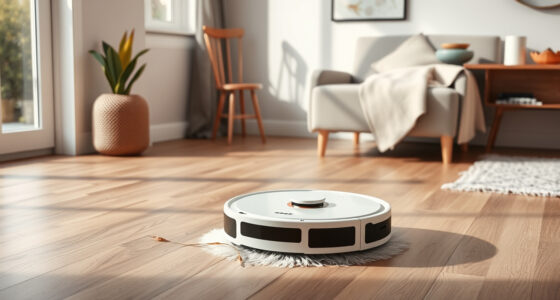
A robotic vacuum cleaner is a small, self-guided machine that uses suction and brushes to pick up everyday debris from floors. Most models use sensors and software to move around a room, return to a charging dock, and run on a schedule. Think of it as a floor-care assistant that makes frequent passes, not a full-size vacuum in miniature.
That distinction matters on a Tuesday morning when breakfast crumbs dot the kitchen. A scheduled run can collect the grit before it spreads into the hallway, and some models let you send the robot to just the kitchen from an app. You still need to clear the floor and deal with corners, stairs, and upholstery yourself.
Many robots also mop, but their approaches vary. A basic model may drag a damp pad across the floor, while more expensive machines can use vibrating or rotating pads and a dock that washes them. Either can help with light routine marks, such as faint footprints near the back door; neither should be counted on to replace a thorough manual mop after a sticky spill.
So what they do best is steady upkeep: dust, crumbs, and loose pet hair on reachable floor. That steady rhythm can make a room look tidier between deeper cleans, even if you still bring out a conventional vacuum on the weekend.
Products Worth Considering

Samsung 65-Inch Class M70H Series 4K Mini LED Smart TV (2026)

iRobot Roomba Plus 405 (G181) 2-in-1 Vacuum and Mop Robot with AutoWash Dock

TCL 55 T7 Series 4K 120Hz QLED Smart Google TV (55T7)
As an affiliate, we earn on qualifying purchases.
How smarter navigation saves time—and where it still fails
Robotic vacuum cleaners navigate by using sensors and software to detect their surroundings and choose a route. Many current models map rooms with cameras, laser-based lidar, or a mix of sensors, then let you name rooms, draw no-go zones, and set cleaning schedules in an app. A useful map turns “clean somewhere downstairs” into “clean the kitchen after breakfast.”
Earlier robots often bounced from wall to chair leg in semi-random patterns. Many newer ones follow planned routes, much like a delivery driver using a street map instead of wandering block by block. That can reduce missed patches and repeated passes, which matters when a battery or cleaning window is limited. But a map shows where things are; it doesn’t guarantee the robot can get past them. A charging cable snaking beside the sofa can still catch a brush, and a dark floor or low furniture can confuse some models.
Navigation also depends on the hardware. A camera-based robot may work better with the lights on, while lidar-based navigation generally does not depend on visible light in the same way. Obstacle recognition can help identify shoes, toys, or cables, but its results vary by model and conditions. Recognition is a convenience, not a substitute for preparing the floor: an object that is low, partly hidden, or visually confusing can still cause a jam or make the robot take a longer route. A sock tucked under a chair may still become a roadblock.
Give a new robot a supervised first run in daylight. Watch how it approaches rugs, thresholds, and chair legs, then use the map to block off trouble spots. This is useful because a successful map depends on the real shape of your rooms and furniture, not just the route shown in an app. That small trial tells you more about your home than a perfect-looking app demo.
Which floors and messes your robot will clean best
Robotic vacuum cleaners are most useful for frequent cleaning on open floors, where they can pick up dust, crumbs, and pet hair without squeezing around piles of clutter. Their results depend on the floor, debris, brush design, and room layout as much as on advertised suction figures. A clear hardwood hallway is an easier job than a shag rug hemmed in by chair legs. This is why a model’s headline suction number alone is a weak guide: it does not tell you whether the robot can reach the mess or keep its brush turning once it gets there.
Many models handle low- or medium-pile carpet and area rugs, but thick rugs, long fringe, and some dark or patterned surfaces can cause trouble. A robot may struggle to climb a high edge, tangle in fringe, or misread a dark patch as a drop-off. If your living room has mixed flooring, look for carpet detection and adjustable suction, then check the manufacturer’s floor guidance. Those features may help it adapt, but they add little if the robot cannot cross a rug’s edge or if your particular rug is outside the stated limits. For example, a robot that crosses a low woven rug smoothly may still snag on a tasselled runner in the same house.
Brushes matter in homes with shedding pets or long hair. Hair can wrap around a roller and collect in the filter even when the robot picks it up well at first. A tangle-resistant brush may reduce cleanup, but it doesn’t remove the need to inspect it; brush design can also affect how well a model collects larger debris or reaches along edges. After several runs in a home with a long-haired dog, you may find a tight ring of fur around the roller that takes a minute to cut away. If maintenance feels burdensome, the robot may get used less often, which reduces the value of its scheduled cleaning.
Measure furniture clearance and check threshold height before buying. A robot that can’t fit under your bed or climb a doorway lip won’t clean those spots, however impressive its app looks. These limits determine which floors it can cover without your help. If you have stairs, plan to carry it between floors unless your model and routine support separate mapped levels.
Compare the features that make a real difference at home
The most useful robotic vacuum features solve a problem you actually have: room control for a busy household, a hair-friendly brush for shedding pets, or a compact dock for a narrow entryway. Newer product trends include better app controls, obstacle recognition, more capable mopping, and docks that empty dustbins or wash pads. Those additions can save effort, but they also bring extra cost, space needs, and maintenance. The tradeoff is practical: a feature only saves time if it works with your floors and routines often enough to offset the attention it needs.
| Feature | Helpful when… | What to check |
|---|---|---|
| Room mapping | You want to target the kitchen or avoid a play area. | Can you edit rooms and set no-go zones? |
| Obstacle recognition | Small items often end up on the floor. | Does it handle your household’s cables and toys reliably? |
| Mop function | You want routine help with light marks. | Is the pad dragged, vibrating, or rotating, and how is it cleaned? |
| Multifunction dock | You want less frequent bin or pad handling. | How much room, noise, water, and consumables does it add? |
Imagine a small apartment with mostly wood floors and one cat: a basic mapped vacuum may cover the real need without a bulky wash-and-dry dock. In a larger home with frequent pet hair and regular mopping, automated pad care may save enough hands-on effort to justify the extra space and price. The difference is the work each household would otherwise do: a large dock can reduce repeated maintenance, but it cannot make a cramped space bigger or remove the need to manage water and replacement supplies.
Check connected features with the same care you give cleaning features. App maps and household data may be stored or shared, and some controls may rely on cloud services. Read the app’s privacy settings and see whether basic cleaning still works if Wi-Fi goes down. That affects how useful the robot remains during an internet outage and whether you are comfortable with the convenience its connected features provide.
Set a simple routine that keeps cleaning useful
A robot vacuum stays useful when you prepare the floor, set a realistic schedule, and clean its parts before they become clogged. Frequent short runs can keep everyday debris down, while a high-traffic home or shedding pet may call for more runs and more bin checks. Start with a few supervised sessions instead of assuming the robot can roam unattended from day one. A schedule that matches when rooms are clear is more likely to finish successfully and less likely to turn cleaning into repeated rescue missions.
- Clear the route. Pick up cords, socks, small toys, and pet waste, then tuck rug fringe out of the way.
- Map and test. Run the robot through each room, check thresholds and furniture, and mark problem areas as no-go zones.
- Choose a schedule. Try a kitchen run after breakfast or a whole-floor run when the rooms are usually empty.
- Check the results. Look at corners, rugs, and the bin after a few runs; adjust the route or timing if crumbs remain.
- Clean the machine. Remove hair from brushes, clear the filter as directed, and wipe sensors when dust builds up.
For example, a household with a toddler might run the kitchen after lunch, but first move blocks and check that the robot won’t reach a water bowl. Pets can be startled by the noise or movement, so watch their first encounters and give them a quiet place to retreat. The point of checking these details is to make the routine repeatable: a robot that regularly tangles with toys or disrupts a pet will be left idle more often.
Even self-emptying or self-cleaning docks need care. You may still need to replace a dust bag, refill clean water, dispose of dirty water, or wash a mop pad. Set a reminder that fits your use rather than waiting for the robot to announce a problem. These docks shift some maintenance into less frequent tasks; they do not remove it, so consider whether the saved trips to the bin or sink are worth the space and upkeep.
Decide whether the time saved is worth the trade-offs
A robot vacuum is worth buying when it can make frequent maintenance cleaning easier in the home you actually have. It is less suitable as your only vacuum if you have deep-pile carpet, lots of stairs, persistent clutter, or tight spaces it can’t reach. The value comes from having cleaner floors between deeper cleans, not from never touching a vacuum again. If the robot covers only part of your floor, think of its benefit as the upkeep it saves in those rooms, then weigh that against the manual cleaning still required elsewhere.
Compare the total routine, not just the purchase price. A simpler model may ask you to empty its bin more often; a self-emptying dock can reduce that task but occupies floor space and may need bags. A mop dock can wash and dry pads, yet you still have to handle water and clean the dock. For someone in a small flat, a tall dock beside the kitchen might be more trouble than a quick bin empty. Over time, the best fit is often the model whose recurring tasks you can comfortably keep up with, not the one with the longest feature list.
Noise and occasional rescues matter too. A scheduled run may disturb a video call, and a robot may need help after catching a loose cable or getting stuck on a threshold. If your floors are often crowded, the time you spend clearing them can erase some of the convenience. Consider when the robot can run and how often you would need to prepare the rooms; that makes the difference between automation that fits your day and a device that adds another step.
Before buying, list your floor types, furniture clearance, thresholds, pets, available dock space, app preferences, and likely replacement-part costs. Compare independent tests and the return policy, because performance can vary from one home to another. A model that works beautifully in an open showroom may behave differently around your braided rug and dining chairs. A return window is especially useful because it lets you judge the parts that are hard to predict from specifications: navigation around your furniture, noise in your rooms, and how much maintenance the robot actually needs.
Frequently Asked Questions
Are robotic vacuum cleaners worth it?
They can be worth it if you want frequent upkeep and have floors the robot can navigate. They are less useful as a complete replacement for a conventional vacuum in homes with stairs, dense clutter, or deep-pile carpet.
Do robotic vacuums work on carpets and rugs?
Many clean low- or medium-pile carpet and area rugs, but performance varies. Thick rugs, fringe, and some dark or patterned surfaces can cause problems, so check the model’s floor guidance and reviews for similar surfaces.
Can a robot vacuum handle pet hair?
Many models pick up pet hair, but hair can wrap around brushes or clog filters. Look for a brush designed to reduce tangles and expect to check it regularly, especially if your pet has a long coat.
Do robotic vacuums really avoid obstacles?
They can avoid walls and furniture and some models recognize common objects, but small or low items may still be missed. Pick up cables, socks, toys, and pet waste before a run until you know how the robot behaves in your home.
How often should I run a robot vacuum?
Set the schedule around foot traffic, dust, and pets. A frequent short run can keep everyday debris down, while a busy home or shedding pet may call for more frequent runs and bin checks.
Do robot vacuums need Wi-Fi?
Wi-Fi commonly supports app setup, remote control, maps, and schedules. Basic cleaning may work without internet on some models, but capabilities differ, so check how the robot can be operated locally before buying.
Conclusion
Choose a robotic vacuum for the cleaning pattern your home can support: open routes, reachable floors, and a routine you’ll maintain. Match its brushes, navigation, and dock to your real needs, then supervise early runs and adjust the map when the robot meets your furniture.
A good robot won’t make every chore disappear. It can make the everyday dust less noticeable, one quiet lap across the kitchen at a time.