If your robot vacuum has reduced suction, start by checking and cleaning the filters, brushes, and air pathways, as dust, hair, or debris can block airflow. Be sure to remove and wash washable filters, trim tangled hair from brushes, and clear obstructions from intake ports or hoses. Overfilled dustbins also restrict suction, so empty them regularly. For more tips on restoring your vacuum’s power and maintaining peak performance, keep exploring the solutions provided.
Key Takeaways
- Check and clean or replace filters to ensure unobstructed airflow and optimal suction.
- Remove and clean brushes, removing hair and debris that can impede movement and suction.
- Inspect air pathways, hoses, and cyclone chambers for blockages and clear any obstructions.
- Empty the dustbin regularly to prevent airflow restrictions from overfilling.
- Perform overall maintenance, including filter, brush, and pathway checks, and test vacuum performance afterward.

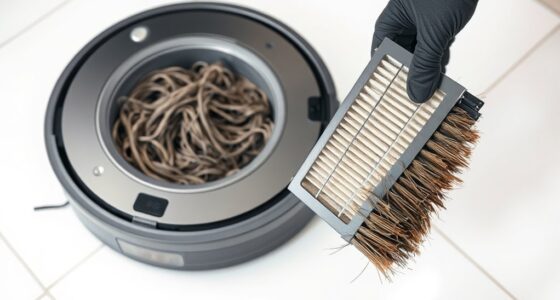
If your robot vacuum isn’t cleaning as effectively as it used to, reduced suction could be the culprit. One of the first things you should check is the filter. Over time, filters can become clogged with dust, hair, and debris, restricting airflow and diminishing the vacuum’s power. To fix this, remove the filter according to your model’s instructions and inspect it closely. If it looks dirty or clogged, wash it with water if it’s washable, or replace it if it’s a disposable filter. Regularly cleaning or replacing your filter guarantees maximum airflow, which directly impacts suction strength. Don’t forget to dry the filter thoroughly before reinstalling, as moisture can cause mold or damage.
Check and clean or replace your filter regularly to maintain strong suction.
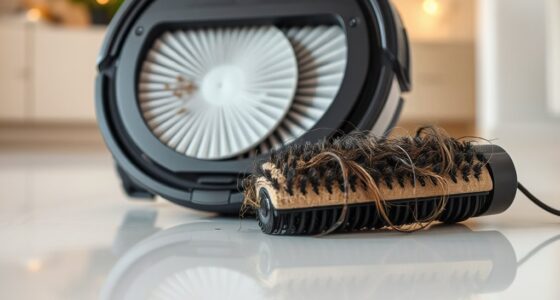
Besides the filter, brush maintenance plays a vital role in maintaining ideal suction. Hair, strings, and debris tend to wrap around the brushes, impeding their movement and reducing the vacuum’s overall cleaning efficiency. To keep your robot performing at its best, remove the brushes and clear away any tangled hair or debris. Use a brush cleaning tool or scissors to trim away stubborn tangles carefully. Check the brush bearings and axles for wear or damage, replacing them if necessary. Properly maintained brushes spin freely and make full contact with the floor, which helps lift dirt and debris into the vacuum’s intake. When the brushes are in good shape, airflow remains unobstructed, and suction remains strong.
In addition to filters and brushes, make sure there are no blockages in the vacuum’s air pathways. Check the vacuum’s intake port, hose, or cyclone chamber for obstructions. Clear out anything that might be blocking airflow, which can considerably reduce suction power. Regularly emptying the dustbin is also essential—overfilled bins restrict airflow and lessen cleaning effectiveness. Make it a habit to empty and clean your vacuum’s dustbin after each use, especially if you vacuum frequently or have pets that shed a lot.
Combining these steps—keeping filters clean, maintaining brushes, and clearing air pathways—can dramatically improve your robot vacuum’s suction. After performing these checks and maintenance tasks, test your vacuum to see if cleaning performance improves. If you still notice weak suction, consider consulting the manufacturer’s troubleshooting guide or contacting customer support for further assistance. Staying proactive with regular maintenance guarantees your robot vacuum continues to perform efficiently and keeps your floors spotless.
Frequently Asked Questions
Can a Software Update Improve Suction Power?
Yes, a software update can improve suction power. Manufacturers often release updates that optimize your robot vacuum’s performance, including suction enhancement. By installing the latest software, you help guarantee your device runs more efficiently, potentially boosting suction strength and cleaning effectiveness. Regular updates fix bugs and improve features, so it’s a good idea to check for new firmware to keep your vacuum operating at its best.
Does the Type of Flooring Affect Vacuum Suction?
Yes, the type of flooring impacts your robot vacuum’s suction efficiency. Hard floors like tile or hardwood typically allow for better suction because debris is easier to pick up, while carpets can reduce suction power due to thicker fibers. Adjusting settings or using the appropriate brush roll can help optimize cleaning performance across different flooring types, ensuring your vacuum maintains strong suction regardless of the surface.
How Often Should I Replace Filters for Optimal Suction?
Think of your vacuum’s filters as the lungs of your cleaning robot. To keep it breathing easy, replace filters every 2-3 months, depending on usage and filter lifespan. Regular replacement maintains ideal suction and prevents clogging. If your robot runs frequently or on pet hair, consider more frequent changes. Staying on top of filter replacement ensures your vacuum performs at its best, keeping your home spotless with ease.
Are There Specific Brands More Prone to Suction Issues?
Some brands are more prone to suction issues due to varying brand reliability and suction durability. Cheaper or lesser-known brands often don’t prioritize high-quality components, leading to frequent problems. On the other hand, reputable brands like iRobot or Dyson usually offer better suction durability and more reliable performance. If you want to avoid issues, invest in trusted brands known for their quality and durability, which tend to maintain superior suction longer.
Can External Damage Cause Reduced Vacuum Suction?
External damage can definitely cause reduced vacuum suction. When your robot vacuum sustains dents, cracks, or broken parts, it often results in suction impairment. Damaged wheels, the brush, or the suction inlet can all interfere with airflow, decreasing performance. To fix this, inspect for visible damage, replace broken components, and make sure everything fits snugly. Addressing external damage promptly helps restore your vacuum’s suction power and keeps it running efficiently.
Conclusion
To keep your robot vacuum working at its best, regular maintenance is key. Did you know that cleaning the filters and brushes can restore up to 80% of its suction power? By checking for blockages and replacing worn parts, you guarantee efficient cleaning every time. Staying proactive not only prolongs your vacuum’s lifespan but also saves you time and money. Keep these tips in mind, and your robot vacuum will continue to impress with its cleaning prowess!