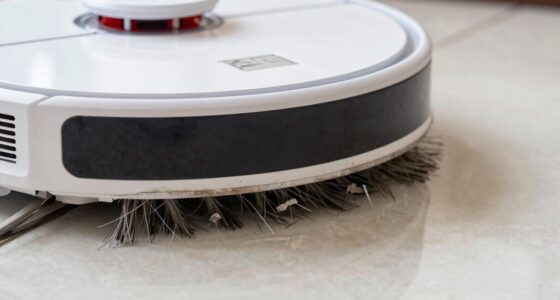

If your Roborock Q7 M5+ robot vacuum isn’t connecting to WiFi, it can disrupt your cleaning routine and app control. This guide covers common causes and proven fixes to get your device back online quickly and safely.

Get cleaning gear delivered free with Prime
- Fast, free delivery on millions of items
- Prime Video, Amazon Music and more included
- Member-only deals all year
Before troubleshooting, ensure your WiFi network is stable and your firmware is up to date. Follow these step-by-step solutions to resolve connectivity issues effectively.
Key Takeaways
| Check network settings | Ensure your WiFi is stable and compatible. |
| Restart devices | Power cycle your vacuum and router. |
| Update firmware | Keep your Roborock app and device firmware current. |
| Reset connection | Reconfigure WiFi settings on your vacuum. |
| Verify WiFi frequency | Use 2.4 GHz WiFi, not 5 GHz, for better compatibility. |
Check Your WiFi Network
- Ensure your router is working correctly and has internet access.
- Confirm your WiFi is operating on 2.4 GHz, as many Roborock models prefer this band.
- Restart your router to refresh the connection.
Restart Your Roborock Vacuum
- Power off the vacuum by pressing and holding the power button.
- Wait 30 seconds, then turn it back on.
Update Firmware & App
- Open the Roborock app and check for firmware updates; install if available.
- Ensure your app is updated to the latest version from the app store.
Reconfigure WiFi Settings
- In the app, select your device and go to WiFi settings.
- Choose ‘Forget WiFi’ or ‘Reset Network Settings’ on the vacuum.
- Reconnect by selecting your WiFi network and entering the password.
Additional Tips & Precautions
- Keep your device within close proximity to the router during setup.
- Avoid using VPNs or firewalls that may block connection.
- Ensure firmware and app are always current for optimal compatibility.
The Products in This Guide

roborock Q7 M5+ Robot Vacuum and Mop
- ✔ Self-Empty: Yes
- ✔ Pet Hair: Yes
- ✔ Cleaning Cycles: 7-9 weeks

4 Pack Washable Filter
- ✔ Filter Type: HEPA
- ✔ Material: Washable
- ✔ Compatibility: Multiple Roborock models
roborock Q7 M5+ Robot Vacuum and Mop
The Roborock Q7 M5+ is a powerful robot vacuum with advanced navigation and strong suction. Ensuring its WiFi connection is stable is key to enjoying its full smart features.
Pros:
- Up to 7-9 weeks self-emptying
- 10000Pa suction power
- PreciSense LiDAR navigation
- App control ease
Cons:
- Requires stable WiFi
- Setup may be complex for some users
- Firmware updates necessary
Best for: Homeowners seeking a powerful, self-emptying robot vacuum with reliable WiFi connectivity.
Not ideal for: Users with unstable WiFi or limited technical experience.
Bottom line: Ensure your WiFi setup is optimal for seamless Roborock operation.
4 Pack Washable Filter
Replacing your filters with the 4 Pack Washable Filter ensures optimal airflow and filtration, supporting your Roborock’s WiFi stability and cleaning efficiency.
Pros:
- Compatible with multiple models
- Washable and reusable
- True HEPA filtration
- Easy to install
Cons:
- Must clean regularly
- Not OEM but performs well
- Replacement needed every few months
Best for: Maintaining peak vacuum performance and air quality.
Not ideal for: Users seeking OEM parts only.
Bottom line: A cost-effective way to keep your vacuum running smoothly.
Frequently Asked Questions
Why won’t my Roborock connect to WiFi?
Common causes include unstable WiFi, incorrect network settings, or outdated firmware. Follow the troubleshooting steps to resolve these issues.
Should I use 2.4 GHz or 5 GHz WiFi?
Roborock devices generally prefer 2.4 GHz WiFi for better compatibility and stable connection.
How do I reset my Roborock WiFi connection?
In the app, select your device and choose the option to forget or reset WiFi settings, then reconnect with your network.
What if my vacuum still won’t connect after troubleshooting?
Try restarting your router and vacuum, updating firmware, or contacting Roborock support for further assistance.
Reconnecting Your Roborock: Quick Tips for Success
Restoring WiFi connectivity to your Roborock Q7 M5+ is often straightforward when following the proper troubleshooting steps. Ensuring your network stability, updating your firmware, and correctly reconfiguring the device can make a significant difference. With patience and careful setup, your vacuum will be back to cleaning via app control in no time.
Affiliate disclosure: As an Amazon Associate we earn from qualifying purchases. Prices and availability are accurate as of the time of publishing.
Halloween Picks
halloween
As an affiliate, we earn on qualifying purchases.